 WatchWalls AI
Apple Watch Couple Wallpaper: Best His & Hers Matching Designs
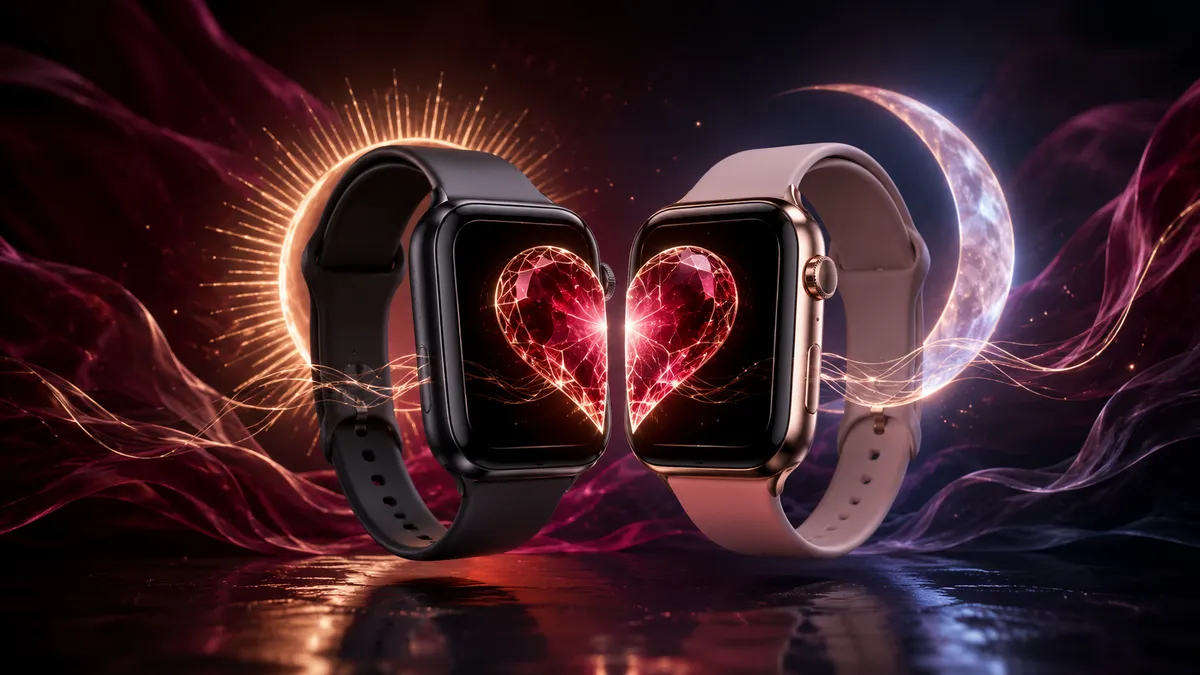
A couple wallpaper on Apple Watch lets you and your partner wear matching or complementary designs on your wrists. The most popular options are split-heart images, sun-and-moon pairs, and cropped halves of a shared photo. Set them up by saving both wallpapers to each iPhone, then assigning them through the Watch app or WatchWalls. The whole process takes under five minutes per watch.
Why Couple Wallpapers Are Trending
Matching accessories between partners are nothing new — think friendship bracelets, identical sneakers, coordinated outfits. But wearable tech has added a new layer. Since Apple Watch sits on your wrist all day, a shared wallpaper design becomes a quiet, constant reminder of your relationship without being as overt as a tattoo or a piece of jewelry.
The numbers back this up. A search for “couple wallpaper” on Pinterest returns over 947 million ideas. TikTok videos showing couples revealing matching watch faces regularly pull six-figure view counts. The trend accelerated in 2025 when more couples started gifting Apple Watches in pairs during holiday seasons, and it has only grown since.
What makes it stick is the low commitment, high payoff dynamic. You do not need to buy matching bands (though you can). You do not need the same watch model. All you need are two images that work together — and you can swap them any time the mood changes. Anniversary trip photo one month, Halloween skeletons the next.
12 Best Couple Wallpaper Ideas for Apple Watch
Below are twelve proven apple watch couple wallpaper concepts. Each one works across all watch sizes and looks good whether you are wearing a Series SE or an Ultra 2.
1. Split Heart
The classic. One watch shows the left half of a heart, the other shows the right. When you hold your wrists side by side, the heart completes. This design works best on a solid dark background — black, deep navy, or charcoal — so the heart shape pops. Use a bold red or pink for maximum contrast, or go subtle with a white outline on black.
2. Sun and Moon
One partner wears the sun, the other wears the moon. This his and hers apple watch wallpaper is popular because it carries a built-in meaning: opposites that belong together. A warm golden sun on a cream background pairs naturally with a silver crescent moon on deep blue. You can go realistic (photographed textures) or illustrated (line art, watercolor).
3. King and Queen Crowns
A minimal crown icon centered on each watch — a king’s crown on one, a queen’s tiara on the other. Gold on black is the default palette, but white on burgundy or silver on forest green also works well. Keep the icon simple; at 40 mm a detailed crown turns into a blur.
4. Matching Sunset or Beach Photo
Take a photo during a trip together and use the same image on both watches — either identical or with slightly different crops. Sunsets work especially well because the gradient of warm colors fills the small screen without needing a clear subject. A beach silhouette of you both holding hands is another strong option.
5. Initials on Dark Background
His initial on her watch, her initial on his. Use a serif or script font, keep the letter large and centered, and place it against a dark textured background — dark marble, brushed metal, or matte black. This is one of the most understated matching couple watch wallpaper options, and it works well in professional settings where something flashier might feel out of place.
6. Puzzle Pieces That Fit Together
Each watch shows one puzzle piece. When placed next to each other, the pieces interlock. The design reads well even at small sizes because puzzle-piece outlines are thick and recognizable. Use a matching pastel palette — mint and lavender, peach and sky blue — to keep the look soft.
7. Yin and Yang
Split the yin-yang symbol across two watches. One gets the dark half with the light dot, the other gets the light half with the dark dot. The circular shape of the symbol fits naturally inside the rounded-rectangle watch face. Stick to the traditional black and white, or recolor it — teal and coral, navy and gold — to match your band colors.
8. Matching Constellations
Use each partner’s zodiac constellation as their wallpaper. A Scorpio constellation on one watch, a Pisces on the other — both rendered in the same style (thin white lines on a starry dark background). The matching style makes them feel like a pair even though the actual star patterns differ. This is a good choice for couples who are into astrology.
9. Same Photo, Different Crops
Pick a wide horizontal photo — maybe from your last vacation — and crop the left third for one watch, the right third for the other. When placed side by side, the image reconnects. This works better with horizontal or panoramic shots that have enough horizontal span to split cleanly.
10. Heartbeat Line
A continuous EKG-style heartbeat line that runs across both watches. One watch shows the first half of the heartbeat, the other shows the second half. The medical-monitor aesthetic ties in neatly with the Apple Watch’s own heart-rate sensor. White or green line on black background is the cleanest version.
11. Lock and Key
One watch shows a lock, the other shows the key. This couple watch face concept works as a silhouette (black shapes on a colored background) or as a more detailed illustration. Keep the objects centered and sized to fill about 60% of the screen so they remain recognizable when the watch is on your wrist.
12. Matching Pet Photos
If you share a pet, put the same photo on both watches — or use two different photos of the same animal. A close-up of your dog’s face or your cat lounging works well because pet portraits are naturally centered compositions. Crop tight so the animal fills the frame, and the small screen will do the rest.
How to Set Matching Couple Wallpapers on Both Watches
Once you have your two images ready, the setup process is straightforward. You will need both iPhones and both Apple Watches nearby.
Method 1: Through the Watch app on iPhone
- Save both wallpaper images to one iPhone (AirDrop the second image from your partner’s phone if needed).
- Open the Watch app on that iPhone.
- Tap Face Gallery at the bottom.
- Select the Photos face type.
- Choose the correct image for that watch and tap Add.
- Repeat with the second iPhone and the second image.
Method 2: Directly from iPhone Photos
- Open the image in Photos on your iPhone.
- Tap the Share button (square with arrow).
- Scroll down and tap Create Watch Face.
- Choose Photos as the face type.
- Adjust the crop, add or remove complications, then tap Add.
Need a step-by-step walkthrough with screenshots? See our full guide on how to change Apple Watch wallpaper.
Method 3: Using WatchWalls
- Go to WatchWalls on each iPhone.
- Browse or generate matching wallpapers.
- Download the correct version for each watch model.
- Set as watch face through the Watch app or Photos share sheet.
The images do not need to be the same resolution as long as each one meets the minimum dimensions for its watch model. A 1080 x 1920 image will work fine on any Apple Watch — iOS will crop and scale it automatically. For exact sizes, see the resolution guide below.
Best Color Combos for Couple Watches
Coordinating colors between the two wallpapers makes the pair feel intentional rather than random. You can also match your band colors to the wallpaper palette for a fully coordinated look. Here are the combinations that work best on the small Apple Watch screen.
Black + Gold — The most popular pairing. One watch gets a gold design on black, the other gets the inverse or a complementary gold pattern. Looks polished and works with every band color. This combination pairs well with the band and face matching guide we published earlier.
Navy + Blush Pink — A softer alternative to black and gold. Navy on one watch, blush on the other, with the design elements (heart halves, initials, constellations) rendered in white on both. Feels romantic without being loud.
White + White — Same design, same white background, same accent color. The match is in the concept, not the contrast. This works well for minimalist couples who want the look without the “his vs hers” split.
Forest Green + Burgundy — An underrated combination that looks especially good in fall and winter. Rich, warm, and distinct from the typical pink-and-blue couples palette.
Matching Band Colors — If you both already own matching Apple Watch bands, pull the hex color from the band and use it as the wallpaper accent. A sand-colored Sport Band with a sand-toned wallpaper creates a clean monochrome wrist stack. Check our aesthetic wallpaper ideas for more palette inspiration.
Where to Find Couple Wallpapers
You have four reliable sources for ready-made his and hers apple watch wallpaper sets. Each has trade-offs in price, uniqueness, and convenience.
Etsy
Etsy has the largest selection of couple wallpaper packs for Apple Watch. Sellers offer themed bundles — usually 2 to 10 images per pack — for $2 to $5. You get instant digital download after purchase. Search for “Apple Watch couple wallpaper” or “his and hers watch face” to find the most relevant results. The advantage of Etsy is that the images are designed especially for watch dimensions, so you skip the cropping step entirely.
Pinterest is the best free source for inspiration and downloadable images. Many pins link directly to high-resolution downloads. The downside is that most Pinterest images are not watch-sized — they are phone wallpapers or square graphics — so you will need to crop them. Use Pinterest for finding ideas, then recreate the concept at the correct resolution using Canva or WatchWalls.
Canva Templates
Canva has pre-made watch wallpaper templates that you can customize. Search “watch wallpaper” in the template library, pick a design, duplicate it, and modify the second copy to create a matching pair. You control fonts, colors, and layout. Canva’s free tier covers most needs; Pro ($13/month) unlocks more templates and the background remover tool.
WatchWalls AI Generator
WatchWalls lets you generate custom couple wallpapers using AI. Describe what you want — “split heart, left half, red on black background” — and the generator produces a watch-ready image at the exact resolution for your model. Generate the complementary design for the second watch, download both, and set them. Every pair is unique because AI generation never produces the same output twice.
DIY: Creating Your Own Couple Wallpaper
Making your own matching wallpapers gives you full creative control and costs nothing. Here are three methods, from simplest to most polished.
Method 1: Split a Photo
Take a photo together — a selfie, a horizontal shot from a date, a picture of your hands. Open it in any image editor (even the free Markup tool in iPhone Photos), crop the left half for one watch and the right half for the other. Save both crops at your watch’s resolution. Done.
Method 2: Use Canva
- Open Canva and create a custom canvas. Set the size to your watch resolution (for example, 396 x 484 px for a 46 mm Series 10).
- Design the first wallpaper — add shapes, text, or upload an image.
- Duplicate the canvas.
- Modify the second version to be the complement: the other half of the heart, the opposite zodiac sign, the mirrored initial.
- Download both as PNG files.
- AirDrop each file to the correct iPhone and set as watch face.
Method 3: WatchWalls AI + Custom Prompt
- Go to WatchWalls.
- Type a prompt for the first design: “golden sun on warm cream background, centered, minimal.”
- Generate and save.
- Type the matching prompt: “silver crescent moon on dark blue background, centered, minimal.”
- Generate and save.
- Set each image on the corresponding watch.
The AI approach is the fastest way to get a polished result without any design skills. You describe what you want in plain English, and the tool handles composition, color balance, and resolution. For more wallpaper creation ideas, browse our Apple Watch wallpaper ideas collection.
Resolution Guide
Both watches need wallpapers that match their specific screen resolution. Here is a quick reference table. If your image is larger than these dimensions, iOS will crop it automatically — just make sure the aspect ratio is close to portrait (taller than wide).
| Watch Model | Case Size | Resolution (px) |
|---|---|---|
| Apple Watch Ultra 2 | 49 mm | 502 x 410 |
| Apple Watch Series 10 | 46 mm | 416 x 496 |
| Apple Watch Series 10 | 42 mm | 374 x 446 |
| Apple Watch SE (2nd gen) | 44 mm | 368 x 448 |
| Apple Watch SE (2nd gen) | 40 mm | 324 x 394 |
If you and your partner have different watch models, design each wallpaper at its own resolution. The visual concept stays the same — only the pixel count differs. A split-heart design looks the same on a 42 mm and a 46 mm as long as each image is cropped to fill the correct canvas size. Check our matching Apple Watch and iPhone wallpaper guide if you want to extend the look to your phone screens too.
Use WatchWalls AI to generate his-and-hers designs at the perfect resolution — no cropping, no resizing. Describe your idea, pick your watch model, and download both wallpapers in seconds.
FAQ
Do both Apple Watches need to be the same model for couple wallpapers?
No. Each watch can be a different model and size. You just need to save each wallpaper at the correct resolution for its specific watch. The design concept — split heart, sun and moon, matching constellations — stays the same regardless of model. Only the pixel dimensions change.
Can I set the same wallpaper on Apple Watch and iPhone?
Yes. Save a higher-resolution version of the same design for your iPhone (1170 x 2532 px for most models) and a watch-sized version for your Apple Watch. You can coordinate all four screens — two phones and two watches — for a fully matched look. Our matching watch and iPhone wallpaper guide covers the full process.
Where can I get free couple wallpapers for Apple Watch?
Pinterest is the largest free source — search “couple wallpaper Apple Watch” and download directly. Canva’s free tier lets you create custom matching designs. WatchWalls also offers free generations so you can build AI-generated couple wallpapers at the exact watch resolution without paying anything.
How do I make a split-heart wallpaper for two Apple Watches?
Open Canva, create a canvas at your watch resolution, draw or paste a heart shape, then position it so only the left half is visible. Duplicate the canvas and reposition the heart so only the right half shows. Download both as PNGs and set each on the respective watch. Alternatively, search Etsy for ready-made split-heart watch wallpaper packs.
Will couple wallpapers drain Apple Watch battery faster?
No. A static photo wallpaper uses the same amount of power regardless of what the image shows. Couple wallpapers are standard JPEG or PNG files and have no impact on battery life compared to Apple’s built-in watch faces. The only wallpaper type that uses extra battery is Apple’s animated faces like Kaleidoscope or Liquid Metal.
