 WatchWalls AI
Best Cyberpunk Wallpaper for Apple Watch: Neon Designs (2026)
- Why Cyberpunk Wallpapers Work So Well on Apple Watch
- 12 Best Cyberpunk Wallpaper Ideas for Apple Watch
- Best Color Combos for Cyberpunk Watch Faces
- How to Set Cyberpunk Wallpapers on Apple Watch
- Resolution Guide by Apple Watch Model
- Where to Find Free Cyberpunk Wallpapers
- Cyberpunk Wallpapers and Band Matching
- FAQ
Why Cyberpunk Wallpapers Work So Well on Apple Watch
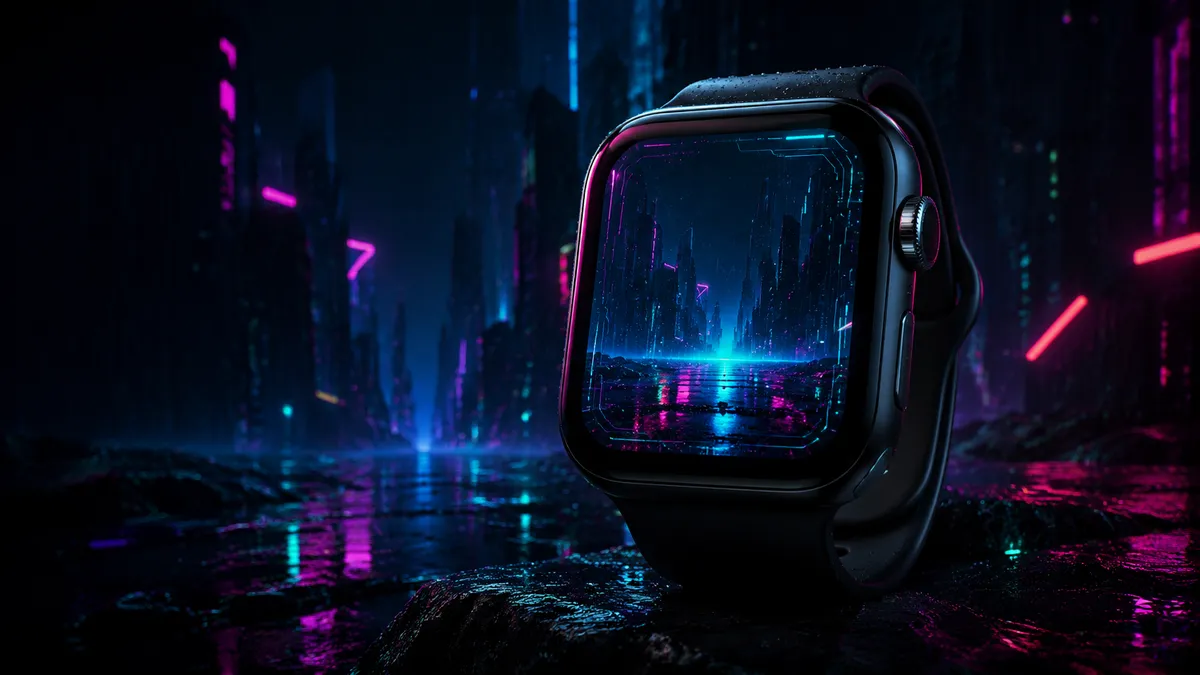
A cyberpunk wallpaper is one of the best things you can put on an Apple Watch screen, and the reason comes down to display technology. Every Apple Watch uses an OLED panel, which means black pixels are literally turned off — no backlight bleeding, no dark grey pretending to be black. When you place a neon element against a true black background, the contrast ratio becomes effectively infinite. That neon pink city sign or electric blue rain streak doesn’t just sit on the screen. It looks like it’s generating its own light.
The small display size works in your favor here. On a large monitor, a cyberpunk city scene spreads out and loses intensity. On a 41mm or 45mm watch face, all that neon energy gets compressed into a tiny area. Colors appear more saturated, the glow effect concentrates, and the overall impact multiplies. It’s the same principle that makes a single candle look brighter in a small dark room than in a cathedral.
Battery efficiency is another bonus. Cyberpunk design relies on dark backgrounds with small areas of bright color, so most pixels stay powered off. A cyberpunk watch face with 70% black space and 30% neon accents uses far less battery than a fully bright wallpaper. And the high-contrast nature of cyberpunk — bright on dark — mirrors the same contrast principles that make watch complications easy to read. Your time, date, and weather stay perfectly legible without any special positioning.
12 Best Cyberpunk Wallpaper Ideas for Apple Watch
Not every cyberpunk image translates well to a watch face. Some designs have too much fine detail that turns to mush at small sizes. These twelve styles hold up at watch-face resolution and maintain their visual punch on a tiny screen.
1. Neon City Skylines
The defining image of cyberpunk: a dark cityscape lit by neon signs and glowing windows. For Apple Watch, choose silhouette-style cityscapes where buildings are mostly dark shapes and neon signs are bright, distinct points of color. A bottom-heavy composition works best — dark sky at the top (where your time display sits) and the neon-lit skyline across the lower third.
2. Glitch Art and VHS Distortion
Horizontal scan lines, RGB color separation, and pixel corruption effects carry strong cyberpunk DNA. These abstract patterns don’t need high resolution to read correctly, so they translate well to small screens. The bold color bands created by RGB splitting give you that distinctive neon palette without complex scene composition.
3. Circuit Board Patterns
Glowing circuit traces connecting nodes across a dark background hit the cyberpunk aesthetic while staying clean at watch resolution. Use a single neon color (electric green, cyan, or gold) against pure black. Keep trace density moderate — a few bold lines with glowing endpoints look better than dozens of thin lines that blur together.
4. Neon Signs with Asian Text Aesthetic
Glowing neon signs with Japanese kanji or Chinese characters are a staple of cyberpunk visual language. On Apple Watch, a single large neon sign against a dark, rain-wet background creates a striking focal point. One or two large characters in hot pink or electric blue, with a soft bloom effect, deliver the full mood without resolution problems.
5. Dark Rain with Neon Reflections
Rain-slicked streets reflecting neon light upward create natural color gradients on OLED. The top stays dark while the bottom comes alive with reflected neon streaks in wet pavement. Blurred reflections actually improve at small sizes because soft edges scale down gracefully. This style pairs naturally with a black Apple Watch wallpaper approach.
6. Cyberpunk Portraits with Masks and Visors
A face partially hidden behind a glowing visor, gas mask, or cybernetic implants — tightly cropped with the face centered on the watch screen. The mask or visor becomes the focal point, glowing in a neon color against the dark surrounding area. Avoid portraits with busy backgrounds; keep the focus on the subject’s glowing elements.
7. Holographic and Iridescent Effects
Holographic textures with smooth prismatic color transitions (pink to purple to blue to teal) suggest light diffracting across a surface. On the P3 color gamut of modern Apple Watch displays, these extended color ranges look remarkably vivid. The iridescent effect plays well with the curved glass edges, creating an almost 3D appearance.
8. Retro-Futuristic Synthwave
Grid lines receding toward a horizon, wireframe mountains, and sunsets in hot pink and orange — synthwave designs are inherently geometric and translate well to any screen size. The color palette (magenta, orange, purple, cyan against black) is practically made for OLED. Our gradient wallpaper collection includes several synthwave-inspired options.
9. Matrix-Style Green Code
Falling green characters on a black background remain one of the most recognizable cyberpunk images ever. For a static wallpaper, use a frozen frame of the falling code effect. Green-on-black is one of the most battery-efficient color combinations for OLED, and the vertical orientation matches the Apple Watch display shape well.
10. Robot and Mech Details
Close-up shots of mechanical joints, robot eyes, or cybernetic limbs work on Apple Watch when they focus on a single element. A glowing robot eye centered on the watch face, or an armored shoulder plate with neon piping — one component rendered large enough to fill the screen, with neon accent lighting providing the color. Dark metallic textures with selective neon highlights keep brightness low and impact high.
11. Purple and Pink Neon Gradients
A pure gradient from deep purple through hot pink into magenta, over a black base, captures cyberpunk color language without any representational imagery. These scale to any resolution without losing quality and leave dark areas for complication readability. Add a subtle horizontal scan-line texture and it moves from “generic gradient” into distinctly cyberpunk territory. See the wallpaper ideas guide for more gradient inspiration.
12. LED Grid Patterns
A grid of illuminated dots or squares against a dark background — like a pixel art display or an LED wall seen up close. Keep the grid coarse (8×10 or 10×12 distinct dots rather than hundreds of tiny pixels). The dark gaps between dots keep screen brightness low, and the geometric regularity plays well with watch complications layered above it.
Best Color Combos for Cyberpunk Watch Faces
Color choice makes or breaks a cyberpunk wallpaper on a screen this small. These three combinations consistently deliver strong results on Apple Watch displays.
Neon Pink + Dark Blue
The classic cyberpunk palette. Hot pink (#FF2D7B) against deep navy blue (#0A0E27) creates contrast that makes people notice your watch from across the room. This combination works with every Apple Watch case color but looks especially striking against the midnight aluminum finish.
Electric Cyan + Pure Black
The most readable cyberpunk color combination. The human eye is more sensitive to blue-green tones than to any other color, which means cyan elements pop even when they’re small. On OLED, a thin cyan line against pure black looks genuinely luminous. It’s also the most battery-efficient neon color — cyan uses only the blue and green sub-pixels, leaving the power-hungry red sub-pixel off.
Purple + Orange
Deep purple (#2D0A4E) paired with bright orange (#FF6B00) creates a tension between warm and cool that the eye finds naturally compelling. Use orange sparingly — about 15-20% of the screen — with purple and black filling the rest. The result feels like a sunset in a city that doesn’t exist yet.
How to Set Cyberpunk Wallpapers on Apple Watch
Getting your chosen cyberpunk wallpaper onto your Apple Watch takes about two minutes:
- Save the image to your iPhone’s Photos app.
- Open the Watch app on your iPhone.
- Tap Face Gallery at the bottom of the screen.
- Select the Photos face. This displays a full-screen image with time and up to four complications.
- Tap “Choose Photo” and select your cyberpunk wallpaper.
- Adjust complications. White or light-colored complications work best against dark cyberpunk backgrounds.
- Tap Add to push the new face to your Apple Watch.
For best results, crop your image to match your watch’s aspect ratio before importing. This prevents auto-cropping from cutting off neon elements at the edges.
Resolution Guide by Apple Watch Model
| Apple Watch Model | Case Size | Resolution (pixels) |
|---|---|---|
| Series 10 / Ultra 2 | 46mm / 49mm | 416 x 496 |
| Series 10 | 42mm | 374 x 446 |
| Series 9 / 8 / 7 | 45mm | 396 x 484 |
| Series 9 / 8 / 7 | 41mm | 352 x 430 |
| SE (2nd gen) | 44mm | 368 x 448 |
| SE (2nd gen) | 40mm | 324 x 394 |
| Series 6 / 5 / 4 | 44mm | 368 x 448 |
| Series 6 / 5 / 4 | 40mm | 324 x 394 |
| Series 3 | 42mm | 312 x 390 |
| Series 3 | 38mm | 272 x 340 |
For cyberpunk wallpapers, download or create images at 500 x 600 pixels or larger. The extra resolution gives you room to reposition the image within the Photos face without losing sharpness. Neon elements with hard edges benefit from higher resolution more than soft gradients do.
Where to Find Free Cyberpunk Wallpapers
You don’t need to create cyberpunk art from scratch. The internet has a massive supply of free cyberpunk imagery that works on Apple Watch with some cropping.
Reddit r/Cyberpunk
The r/Cyberpunk subreddit is one of the largest collections of cyberpunk art and photography online. Sort by “Top – All Time” for iconic images upvoted by hundreds of thousands of users. The related subreddit r/Cyberpunk_Art focuses on original artwork and frequently features watch wallpaper crops shared by artists.
Pinterest excels at visual discovery — search “cyberpunk wallpaper Apple Watch” or “neon dark wallpaper watch” for curated boards. Pin your favorites and download the highest-resolution versions. Always verify image dimensions before downloading, as Pinterest thumbnails can be deceptively small.
Unsplash
Unsplash offers thousands of free cyberpunk-adjacent photographs under a permissive license. Search “neon night city,” “cyberpunk,” or “neon sign dark” to find real-world photography that captures the cyberpunk mood. Real photographs often look better on Apple Watch than digital art because natural lighting creates softer edges that scale down gracefully.
WatchWalls AI Generator
Our AI-powered wallpaper generator at WatchWalls creates custom cyberpunk wallpapers sized for your specific Apple Watch model. Describe what you want — “neon pink city skyline with rain reflections on black” — and the generator produces an image at the correct resolution with no cropping needed.
Cyberpunk Wallpapers and Band Matching
Matching your watch band to the cyberpunk aesthetic takes the whole setup to another level. The band choice affects how people perceive your watch as a complete package.
All-Black Bands
The safest choice for cyberpunk watch faces. A matte black Sport Band or black braided solo loop creates a uniform dark frame around your display, making the neon elements on screen the undisputed focal point. Black works with every cyberpunk color scheme because it never competes with the on-screen colors.
Neon Accent Bands
Match your band color to the dominant neon in your wallpaper. Hot pink neon city wallpaper? A pink Sport Band ties the look together. Cyan circuit board wallpaper? A blue-green band completes it. Match the hue family, not the exact shade — close enough reads as intentional.
Dark Metal Bands
The space black stainless steel bracelet or dark titanium band reinforces the industrial side of cyberpunk. Metal adds a mechanical quality that echoes the genre’s themes of technology. If your wallpaper leans toward mech, circuit, or industrial imagery, metal bands are the natural pairing.
Bands to Avoid
Bright pastel bands, floral patterns, and warm earth-tone leather straps clash with cyberpunk aesthetics. The cozy, organic feel of a tan leather band works against the cold, technological mood. When in doubt, go darker. For more band-wallpaper coordination tips, check the aesthetic Apple Watch wallpaper guide.
Frequently Asked Questions
Do cyberpunk wallpapers drain Apple Watch battery faster?
No — in most cases, the opposite is true. Cyberpunk wallpapers are predominantly dark with small areas of bright neon color. On OLED displays, dark and black pixels use minimal power because those pixels are partially or fully turned off. A cyberpunk wallpaper with 60-80% dark area actually conserves more battery than a fully bright wallpaper. The neon accents occupy such a small percentage of total screen area that overall consumption stays low.
Will a cyberpunk wallpaper work on the always-on display?
Yes, and cyberpunk styles are actually one of the best choices for AOD. When the screen dims, the dark background stays dark and the neon elements dim to a subtle glow. The result still reads as cyberpunk — just moodier and more subdued. High-contrast designs (bright neon on pure black) retain their visual identity in AOD mode better than low-contrast wallpapers. See our always-on display wallpaper guide for more tips.
What watch face type should I use for a cyberpunk wallpaper?
The Photos watch face is the best option. It displays your image full-screen with time and up to four complications overlaid. Save your cyberpunk image to your iPhone’s Photos app, then select it in the Watch app under Face Gallery. The Portraits face can also work for cyberpunk portrait-style images (masked faces, visor shots) because it adds a depth layer between the background and the time display.
Can I make my own cyberpunk wallpaper for Apple Watch?
Yes. Free tools like Canva and Figma work well. Start with a pure black background at your watch’s native resolution, then add neon-colored shapes with a glow or blur effect. In Canva: create a canvas at watch resolution, set the background to black, add a shape in hot pink or cyan, duplicate it, blur the duplicate heavily, and layer the sharp shape on top. The blurred layer creates the neon glow. Add scan lines using a semi-transparent striped overlay for extra atmosphere.
Are cyberpunk wallpapers just for darker Apple Watch models?
No. While cyberpunk wallpapers look particularly striking on midnight, space black, and dark titanium finishes (the dark case blends into the dark wallpaper edges), they also work on silver, starlight, and gold. The contrast between a light case and a dark cyberpunk screen creates a visible frame that highlights the neon elements. Many Apple Watch owners are surprised by how good cyberpunk wallpapers look on lighter cases.
