 WatchWalls AI
Best Zodiac Wallpapers for Apple Watch: Astrology & Star Sign Designs
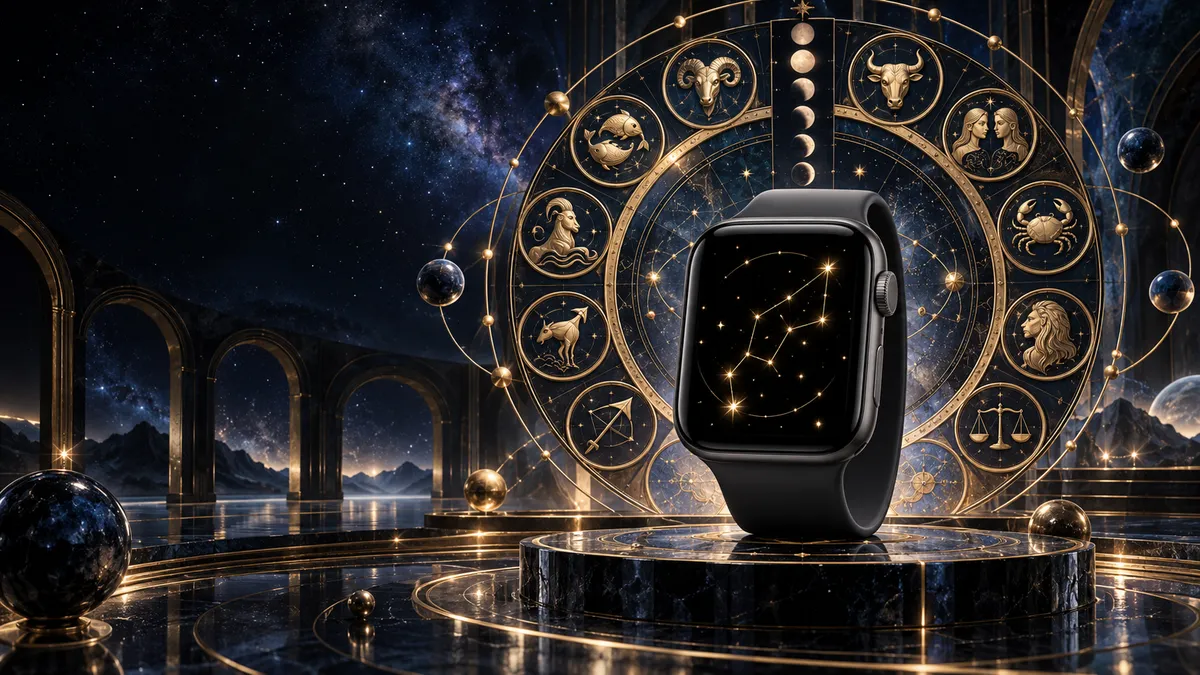
Why Zodiac Wallpapers Feel Personal
A zodiac wallpaper is not just decoration — it is the one wallpaper that belongs to you and no one else born on a different date. Your rising sign, your sun sign, the constellation that was overhead when you were born: none of that matches your coworker’s wrist. That built-in uniqueness makes zodiac wallpaper one of the most requested categories on Apple Watch wallpaper ideas collections.
There is also a social element. When someone glances at your watch and sees a Scorpio glyph or a Pisces fish rendered in neon blue on black, it opens a conversation. Astrology connects people fast — faster than most watch faces. A study from the Pew Research Center found that roughly 29% of American adults say they believe in astrology, meaning nearly one in three people you pass will recognize the symbol on your wrist.
Finally, zodiac designs work exceptionally well on Apple Watch’s OLED display. Because OLED turns off individual pixels for true black, a dark celestial background with glowing constellation lines costs almost no battery drain. You get a stunning star chart and a longer charge — a genuine win.
12 Zodiac Wallpaper Styles to Try
1. Constellation Map
This style plots the exact stars of your sign connected by thin lines — just like a real star atlas. Stick to white or gold dots on a deep navy or black background. The result looks scientific and elegant. Search Pinterest for “[your sign] constellation line art” to find print-quality SVG files you can resize to Apple Watch resolution.
2. Zodiac Symbol Minimalist
Take the glyph for your sign — ♈ for Aries, ♏ for Scorpio — and place it dead center on a solid or gradient background in your sign’s color. No frills. This works best when you want the symbol readable at a glance. Pair it with a matching monochrome watch face for a fully coordinated look.
3. Astrology Wheel
The full 12-sign wheel, with your sign highlighted or enlarged, makes a striking photo wallpaper. Look for circular chart designs with thin gold lines on black. Because the Apple Watch screen is tall and narrow, crop the wheel so your sign sits near the top third of the image. Browse the Pinterest zodiac wheel board for hundreds of ready-to-use options.
4. Moon Phase Cycle
A vertical strip of moon phases — new moon to full moon — suits Apple Watch’s portrait format perfectly. Add the moon phase for your birth date highlighted in gold. Moon phase designs cross well with zodiac themes because lunar cycles govern astrological timing. See the Apple Watch dark wallpaper guide for more lunar options.
5. Star Chart / Sky Map
A sky map shows the actual night sky as it appeared at your birth location and time. Apps like Stellarium let you set any date, time, and place, then export a screenshot. Crop it to 396×484px and you have the most personally meaningful wallpaper possible — literally your sky.
6. Zodiac Animal Illustration
For signs with animal symbols — Aries ram, Taurus bull, Cancer crab, Leo lion, Scorpio scorpion, Capricorn sea-goat, Pisces fish — illustrated versions with fine linework look stunning on Apple Watch. Go for single-color line art (gold, silver, or sign-color) on black. Avoid busy multi-color illustrations; they lose detail on the small screen.
7. Horoscope Element Design
Fire (Aries, Leo, Sagittarius), Earth (Taurus, Virgo, Capricorn), Air (Gemini, Libra, Aquarius), Water (Cancer, Scorpio, Pisces) — each element has a visual vocabulary. Flame textures for fire signs. Topographic lines for earth. Wind swirls for air. Wave patterns for water. Match the element design to your sign and you get something more abstract but deeply aligned with your astrological identity.
8. Celestial Gold on Black
Gold foil-style zodiac art on a matte black background is currently the most popular aesthetic on Etsy’s zodiac wallpaper listings. The contrast is sharp on OLED and the gold reads as premium. Many sellers offer all 12 signs in a matching set for a few dollars — useful if you rotate signs with the seasons.
9. Birth Chart Pattern
Your full natal chart — the wheel with all your planetary placements — converted to wallpaper. You can generate your chart free at Astro.com, screenshot it, invert the colors to dark mode, then crop to watch size. This is the most astrologically complete wallpaper possible and completely unique to you.
10. Zodiac Couple Matching
Two signs side by side or interlocked — popular for couples who want matching Apple Watch wallpapers. A Scorpio and Pisces water pair, or a Leo and Sagittarius fire combo. Check the Apple Watch couple wallpaper collection for coordinated zodiac pair designs where both signs share the same color palette.
11. Galaxy Zodiac Blend
Your constellation overlaid on an actual galaxy or nebula photograph. NASA releases thousands of free Hubble images — find a nebula in colors that match your sign, overlay the constellation lines, and export. The Apple Watch galaxy wallpapers guide has a step-by-step method for building these composites in Canva or Photoshop.
12. Seasonal Zodiac
Change your wallpaper each time the sun enters a new sign — roughly every 30 days. A Virgo wheat-and-earth design in late August, a Libra scales-and-autumn-leaves design in late September. This keeps your watch feeling current with the astrological calendar and gives you a reason to revisit your wallpaper folder monthly.
Best Colors for All 12 Zodiac Signs
Each sign has traditional colors rooted in planetary rulerships and elemental associations. Using your sign’s color as the dominant tone of your zodiac wallpaper creates automatic visual harmony.
| Sign | Dates | Best Wallpaper Color | Background Tone |
|---|---|---|---|
| Aries ♈ | Mar 21 – Apr 19 | Red / Scarlet | Black or deep charcoal |
| Taurus ♉ | Apr 20 – May 20 | Forest Green | Dark moss or midnight navy |
| Gemini ♊ | May 21 – Jun 20 | Yellow / Pale Gold | Slate grey or deep purple |
| Cancer ♋ | Jun 21 – Jul 22 | Silver / Pearl White | Deep ocean blue |
| Leo ♌ | Jul 23 – Aug 22 | Bright Gold / Orange | Black or dark burgundy |
| Virgo ♍ | Aug 23 – Sep 22 | Earthy Brown / Beige | Dark olive or charcoal |
| Libra ♎ | Sep 23 – Oct 22 | Rose Pink / Pale Blue | Soft navy or black |
| Scorpio ♏ | Oct 23 – Nov 21 | Deep Red / Black | Pure black |
| Sagittarius ♐ | Nov 22 – Dec 21 | Purple / Cobalt Blue | Dark indigo |
| Capricorn ♑ | Dec 22 – Jan 19 | Charcoal Grey / Dark Brown | Black or deep slate |
| Aquarius ♒ | Jan 20 – Feb 18 | Electric Blue / Turquoise | Midnight black |
| Pisces ♓ | Feb 19 – Mar 20 | Sea Green / Lavender | Deep teal or navy |
How to Find Your Constellation
Your sun sign constellation is the group of stars the sun was passing through on your birthday. To get the exact star positions for your wallpaper, you have three good options.
Stellarium Web — Go to stellarium-web.org, set the date to your birthday, pick a dark-sky location (away from city lights), and zoom in on your sign’s constellation. Toggle on constellation lines and labels, hide the horizon, and screenshot. This gives you an authentic, scientifically accurate star map at no cost.
Star Map Generator Apps — Apps like Star Walk 2 and Sky Map let you enter a date and generate a clean print-style chart. Many offer export options. Set the chart to dark mode before exporting so it is already optimized for OLED display.
Custom Star Map Sites — Sites like The Night Sky and Mapiful allow you to order a print-quality file for a specific date and location. A standard digital download costs $5–15 and comes at high resolution. Crop the file to 396×484px for Apple Watch Series 9/10 or 352×430px for Apple Watch SE.
Once you have the file, transfer it to your iPhone, open Photos, and follow the steps in the how to change Apple Watch wallpaper guide to set it as your watch face photo.
Band Color Matching by Element
The fastest way to upgrade a zodiac wallpaper look is to coordinate your band with your sign’s element. This creates a cohesive aesthetic from screen to strap.
Fire Signs (Aries, Leo, Sagittarius) — Gold or orange Sport Loop bands, red braided straps, or burnt-copper link bracelets. Gold aluminum Apple Watch cases amplify fire-sign energy. The warm metal echoes the reds and golds in your constellation wallpaper.
Earth Signs (Taurus, Virgo, Capricorn) — Tan, brown, or olive leather bands. Natural walnut leather looks especially good with earthy green or brown constellation wallpapers. Starlight aluminum or stainless steel cases work well for earth signs who prefer understated hardware.
Air Signs (Gemini, Libra, Aquarius) — Silver, white, or pale blue bands. Silver stainless steel or silver aluminum cases reflect the airy, light quality of these signs. A pale grey Sport Band under an electric-blue Aquarius constellation wallpaper is a clean, modern combination.
Water Signs (Cancer, Scorpio, Pisces) — Deep blue, teal, or black bands. Midnight Sport Loop with a silver Pearl case suits Cancer perfectly. For Scorpio, a black band and black case with a deep red constellation wallpaper creates maximum contrast and intensity.
Browse the full collection — dark themes, galaxy designs, couple matching sets, and more — all sized correctly for every Apple Watch model.
View All Wallpaper IdeasResolution & File Format Guide
| Apple Watch Model | Screen Size | Wallpaper Resolution | Format |
|---|---|---|---|
| Series 9 / 10 (45mm) | 45mm | 396×484px | JPEG or PNG |
| Series 9 / 10 (41mm) | 41mm | 352×430px | JPEG or PNG |
| Ultra 2 (49mm) | 49mm | 410×502px | JPEG or PNG |
| SE 2nd Gen (44mm) | 44mm | 368×448px | JPEG or PNG |
| SE 2nd Gen (40mm) | 40mm | 324×394px | JPEG or PNG |
Always save zodiac wallpapers as PNG when the design includes fine constellation lines or thin glyphs. PNG preserves sharp edges without JPEG compression artifacts, which matter at small screen sizes. Keep file size under 5MB to avoid the iPhone Photos app auto-compressing on transfer.
Free Sources for Zodiac Wallpapers
Pinterest — The largest free collection. Search “zodiac wallpaper Apple Watch [your sign]” and filter by vertical images. Most pins link to free download pages. Save pins to a dedicated board organized by sign so you can rotate monthly.
Etsy (free and paid) — Many Etsy sellers offer one free sample sign as a download to showcase a set. Search “zodiac Apple Watch wallpaper digital download.” Paid sets ($3–8) typically include all 12 signs at the correct resolution, which is worth it for the time saved resizing.
Constellation Generator at Stellarium Web — Free, accurate, infinitely customizable. Generate your personal star chart at any scale and crop to any watch model’s resolution.
Unsplash and Pexels — Search “zodiac illustration,” “constellation art,” or “astrology minimalist.” Filter by portrait orientation. These are free for commercial and personal use with no attribution required.
Canva Free Tier — Canva has a “Mobile Wallpaper” template (1080×1920px) with dozens of zodiac and celestial elements you can drag onto a black background, add your constellation lines, and export. Scale down to Apple Watch resolution in any image editor.
Frequently Asked Questions
Yes. The Photos watch face accepts any image from your iPhone library. Save your zodiac wallpaper to Photos, open the Watch app on iPhone, choose Face Gallery, select Photos, and tap your zodiac image. Apple Watch displays it as a static wallpaper behind the time and complications. For the cleanest look, minimize complications so more of the zodiac art is visible.
Dark background designs — constellation maps, celestial gold on black, galaxy zodiac blends — perform best on OLED. True black backgrounds use no power on OLED pixels, so your battery lasts longer. The glowing constellation lines and zodiac symbols appear vivid and sharp against the dark field. Avoid white or light-colored zodiac backgrounds on OLED models; they drain battery faster and can look washed out.
Generate your natal chart at Astro.com for free — enter your birth date, time, and location. Screenshot the chart wheel, open it in Canva or Snapseed, invert the colors to a dark background, adjust contrast, and crop to your Apple Watch’s resolution (see the table above). The result is a wallpaper that shows every planetary placement in your birth chart, not just your sun sign.
Signs with visually distinct glyphs work best in minimalist style: Scorpio (♏), Aries (♈), Aquarius (♒), and Pisces (♓) all have strong, recognizable symbols that read clearly at small sizes. Gemini (♊) and Cancer (♋) glyphs are more compact and can get lost — these signs benefit more from the full constellation map or animal illustration styles.
Most general zodiac wallpapers are sized for Series 9/10. For Apple Watch Ultra (49mm), you need 410×502px resolution. Take any zodiac image you like, open it in Canva at 410×502px, center your constellation or symbol, and export as PNG. The Ultra’s larger screen shows significantly more detail in constellation line art and star charts, making it the best Apple Watch model for intricate zodiac designs.