 WatchWalls AI
Best Butterfly Wallpaper for Apple Watch: Morpho, Monarch & More (2026)
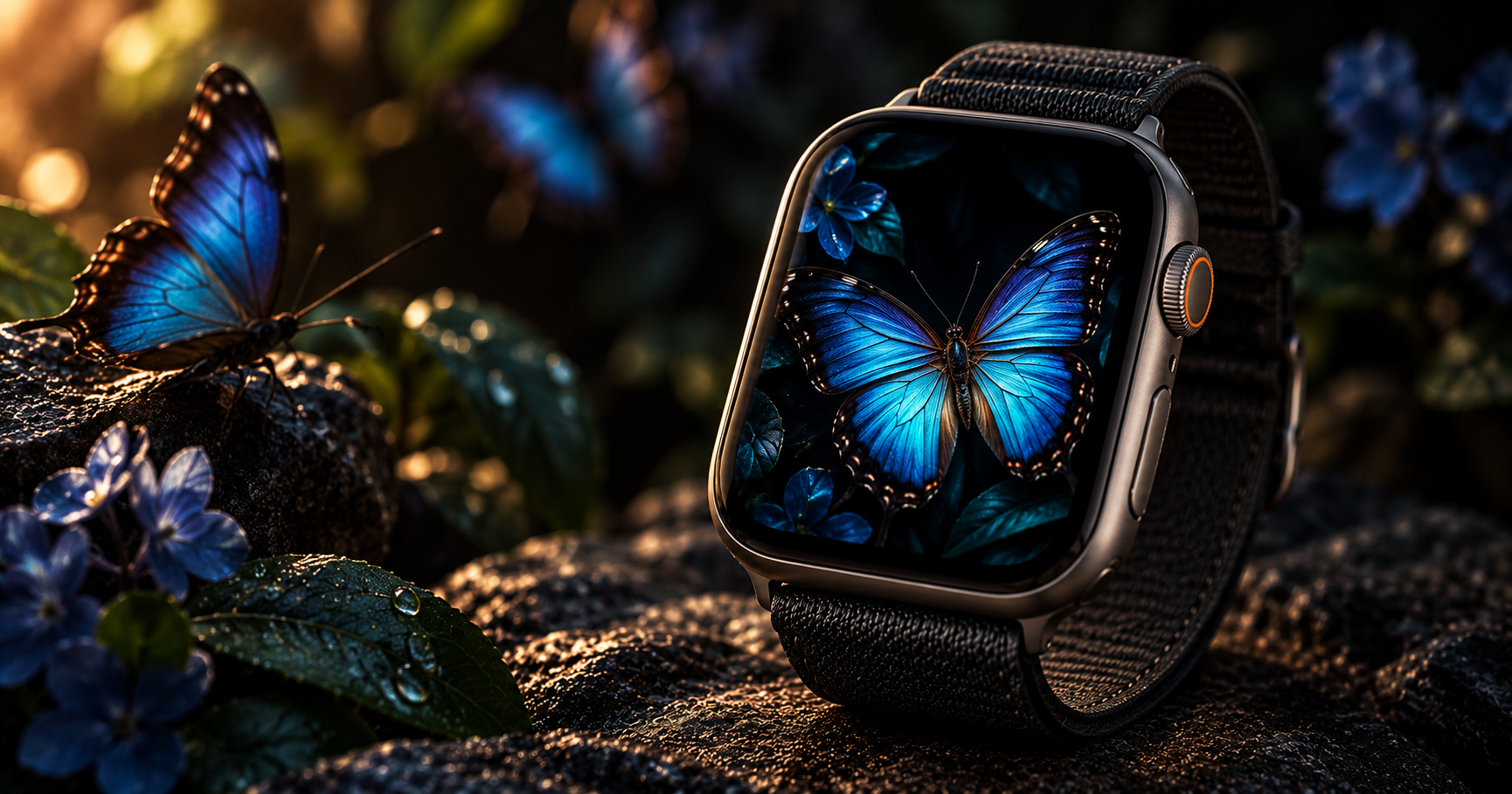
Why Butterfly Wallpapers Shine on Apple Watch
Butterfly wallpaper for Apple Watch works because butterflies are nature’s most vivid, high-contrast subjects. A blue morpho butterfly is electric blue against dark foliage. A monarch is deep orange against green or black. These are exactly the color conditions where OLED displays perform best — saturated, bright subjects floating in darkness with per-pixel illumination making each color glow independently.
The shape matters too. Butterfly wings, when spread, form a natural symmetrical pattern that fills a portrait-oriented screen beautifully. The wingspan maps to the width of the watch face, while the body and antennae create a vertical axis. No other natural subject has this built-in symmetry at exactly the right aspect ratio for a wrist-worn screen.
There is also an emotional resonance that makes butterfly wallpapers consistently popular. Butterflies represent transformation, lightness, and beauty. A butterfly on your wrist is a quiet daily reminder of those qualities — more personal than a landscape, more meaningful than a pattern. This emotional connection is why butterfly wallpapers rank among the top-selling categories on Etsy for Apple Watch, alongside flowers and celestial designs.
For more nature-themed options, see our nature wallpaper guide. For floral designs that pair well with butterflies, see floral wallpapers for Apple Watch.
12 Butterfly Wallpaper Styles for Apple Watch
Ranked by OLED display impact, visual clarity at watch scale, and versatility across case and band combinations.
1. Blue Morpho Wings on Black
The most visually striking butterfly wallpaper: iridescent blue morpho wings fully spread against pure black. The morpho’s blue is not pigment — it is structural color created by microscopic wing scales, which means it shifts and shimmers in photographs. On OLED, the electric blue against true black creates an almost luminous effect. This is the single most popular butterfly wallpaper on every platform and the safest choice for anyone new to the category.
2. Monarch Butterfly Portrait
A monarch butterfly in portrait orientation — wings partially open, showing the classic orange-and-black pattern with white dots. The monarch is the most recognizable butterfly in North America, and its warm orange tones render beautifully on Apple Watch’s P3 wide-color display. Position the butterfly slightly above center with the wing tips reaching toward the edges of the frame. The orange pairs exceptionally well with Gold and Starlight cases.
3. Watercolor Butterfly Illustration
A hand-painted or digitally illustrated butterfly in soft watercolor tones — blended blues, purples, and pinks with visible brushstrokes and paint texture. Watercolor illustrations hold up better than photographs at small sizes because the colors are intentionally bold and the shapes are simplified. The soft edges and color bleeds add an artistic, feminine quality that photographic realism cannot match. See also our watercolor wallpaper collection.
4. Butterfly Garden (Multiple Butterflies)
Two or three small butterflies scattered across the screen against a dark floral background. This creates a scene rather than a portrait — the butterflies appear to be in flight among garden elements. Keep the total number to three or fewer at watch scale; more than three butterflies merge into an indistinguishable cluster. Space them at different heights to create depth and movement.
5. Neon Butterfly on Black
A butterfly rendered in glowing neon outlines — electric blue, hot pink, or purple — against pure black. This cyberpunk-meets-nature style looks futuristic and dramatic on OLED. The neon glow effect works because OLED pixels produce their own light, making the neon outlines appear to genuinely emit light from the screen. This style pairs with our neon wallpaper collection and appeals to people who want nature with an edge.
6. Glass Wing Butterfly
The glasswing butterfly (Greta oto) has transparent wings with visible veining — like stained glass without the color. Photographs of glasswing butterflies create uniquely delicate wallpapers where you can see through the wings to the dark background behind. The transparent effect is subtle but mesmerizing at watch scale, creating a wallpaper that reveals more detail the longer you look at it.
7. Butterfly Wing Macro (Abstract)
An extreme close-up of a single butterfly wing — the individual scales, color gradients, and patterns visible at microscopic level. This removes the recognizable butterfly shape and turns the wing into an abstract color field. The pattern looks like a natural mosaic or textile print. Monarch wing macros produce warm orange-black patterns; morpho macros produce blue geometric scales. Both create wallpapers that are conversation starters when people ask what the pattern is.
8. Butterfly Silhouette
A solid black butterfly silhouette against a colored gradient background — sunset orange, soft pink, or teal. This is the most minimal butterfly wallpaper option. The silhouette is instantly recognizable even at 41 mm because the butterfly shape is universally known. The colored background provides the mood while the silhouette provides the subject. This style works well for people who find photographic butterflies too busy.
9. Gold Foil Butterfly on Dark
A butterfly rendered in metallic gold against dark navy or black — the luxury interpretation of butterfly art. The gold catches light on OLED in a way that flat yellow paint cannot. This style sits at the intersection of nature and luxury, appealing to people who want something elegant without being generic. Pair with a gold Milanese Loop for a fully metallic look. See also our luxury wallpaper guide.
10. Butterfly with Flowers
A butterfly resting on a flower — rose, lavender, or cherry blossom — against a blurred dark background. This classic nature composition tells a micro-story in the tiny watch frame. The flower provides color and context while the butterfly provides the focal point. Use images where the butterfly is sharply in focus and the flower is slightly softer to create depth. Portrait orientation works best when the flower is at the bottom and the butterfly above.
11. Geometric Butterfly (Low-Poly)
A butterfly constructed from geometric triangles and polygons — the low-poly art style applied to butterfly anatomy. The flat-shaded triangles read cleanly at any screen size because each facet is a solid color with sharp edges. This modern, design-forward style appeals to people who love the butterfly motif but prefer a digital aesthetic over photographic realism. Teal, purple, and gold are the most popular color choices for geometric butterflies.
12. Constellation Butterfly
A butterfly shape formed by constellation-style dots and lines — stars connected by thin lines forming wing and body shapes against a dark sky background. This merges the butterfly motif with celestial aesthetics, creating a wallpaper that belongs in both the nature and astronomy categories. Gold or white constellation lines on deep navy or black produce the most elegant result. This connects to our zodiac wallpaper collection.
Butterfly Color Guide — Which Species Look Best on OLED
Different butterfly species produce different color effects on the Apple Watch OLED display:
| Butterfly Species | Primary Color | OLED Performance | Best Case Pairing |
|---|---|---|---|
| Blue Morpho | Iridescent blue | Exceptional — P3 gamut advantage | Silver, Space Black |
| Monarch | Orange + black | Excellent — warm tones glow | Gold, Starlight |
| Swallowtail | Yellow + black | Very good — high contrast | Gold, Midnight |
| Painted Lady | Orange + brown | Good — warm earth tones | Starlight, Gold |
| Glasswing | Transparent + dark | Unique — subtle and delicate | Silver, Natural Titanium |
| Ulysses | Electric blue + black | Exceptional — vivid contrast | Space Black, Midnight |
| Emerald Swallowtail | Green + black | Very good — P3 green accuracy | Midnight, Space Black |
| Purple Emperor | Purple + brown | Good — rich and moody | Space Black, Midnight |
Blue and orange butterflies produce the best Apple Watch wallpapers because those colors hit the sweet spot of OLED rendering — maximum saturation and contrast against dark backgrounds.
Cropping Butterfly Images for Apple Watch
Butterfly images need specific cropping to look their best on the small watch screen:
Fill the frame with wings. A butterfly that occupies only 20% of the frame — surrounded by too much background — loses its impact at watch scale. The wings should span at least 60% of the frame width. Crop tight enough that the butterfly dominates but loose enough that wing tips are not cut off.
Center the body vertically above the midpoint. The butterfly’s body should sit at roughly the 40% mark from the top, with wings spreading outward and slightly downward. This keeps the most colorful wing areas visible above the complication zone at the bottom.
Choose dark backgrounds. A butterfly on a bright green leaf or white background loses the OLED advantage. Dark, blurred backgrounds make the butterfly colors pop and keep the time display readable. If your source image has a bright background, look for another shot or use a photo editor to darken the background before cropping.
Target resolution: 396×484 px for 45 mm, 352×430 px for 41 mm, 410×502 px for Ultra.
For the full wallpaper-setting process, see how to change Apple Watch wallpaper.
Resolution Reference Table
| Apple Watch Model | Screen Size | Recommended Resolution | Aspect Ratio |
|---|---|---|---|
| Ultra 2 / Ultra 3 | 49 mm | 410×502 px | ~4:5 |
| Series 7-10 (45 mm) | 45 mm | 396×484 px | ~4:5 |
| Series 7-10 (41 mm) | 41 mm | 352×430 px | ~4:5 |
| Series 4-6 (44 mm) | 44 mm | 368×448 px | ~4:5 |
| Series 4-6 (40 mm) | 40 mm | 324×394 px | ~4:5 |
| SE (2nd gen) | 40 mm / 44 mm | 324×394 / 368×448 px | ~4:5 |
Band Matching for Butterfly Wallpapers
- Blue morpho + midnight braided Solo Loop: Blue on blue. The braided texture adds organic depth that mirrors the wing’s natural complexity.
- Monarch + orange Sport Band: The obvious match. Screen and band share the monarch’s signature warm orange.
- Watercolor butterfly + lavender Sport Band: Soft purple watercolor tones extended to the wrist. Feminine and cohesive.
- Neon butterfly + black Sport Band: Maximum contrast. The neon glows against the dark band and dark case. Let the wallpaper speak.
- Gold foil butterfly + gold Milanese Loop: Full luxury. Metallic butterfly on screen, metallic mesh on wrist.
- Butterfly with flowers + pink Sport Band: Garden aesthetic from screen to wrist. The pink echoes the flower and butterfly tones.
- Silhouette butterfly + teal Sport Band: The teal background gradient from the wallpaper carried through to the band color.
For more combinations, see our band and face matching guide.
Browse the full WatchWalls collection — hundreds of curated Apple Watch wallpapers including butterfly, nature, and floral designs for every model.
Browse All Apple Watch Wallpapers →
Free Sources for Butterfly Wallpapers
- Unsplash — Butterfly Dark Background: Professional butterfly photography against dark backgrounds. Filter by portrait orientation for watch-ready crops.
- Pexels — Butterfly Macro: Close-up butterfly photographs with excellent detail. Strong in monarch and swallowtail species.
- Pinterest — Butterfly Apple Watch Wallpaper: Community boards with pre-sized butterfly wallpapers. Many include watercolor and illustration styles.
- Canva free tier: Search “butterfly” in the Elements panel for illustrated butterflies you can place on dark backgrounds at 396×484 px resolution.
- Etsy ($2-5): Professional butterfly Apple Watch wallpaper packs with multiple species and styles already sized for every model.
FAQ
What is the best butterfly wallpaper for Apple Watch?
A blue morpho butterfly with wings spread against a pure black background is the best overall choice. The morpho’s iridescent blue renders exceptionally well on Apple Watch’s P3 OLED display, and the black background saves battery while creating maximum contrast. For a warmer look, a monarch butterfly against black is the top alternative.
Where can I find free butterfly wallpapers for Apple Watch?
Unsplash and Pexels have thousands of free butterfly photographs. Search for “butterfly dark background” or “butterfly macro” for the best watch-ready results. Pinterest has pre-sized Apple Watch butterfly wallpapers. Canva’s free tier includes illustrated butterfly elements you can place on dark backgrounds.
What size should a butterfly Apple Watch wallpaper be?
For the 45 mm Apple Watch (Series 7-10), use 396×484 pixels. For 41 mm, use 352×430 pixels. For Ultra models, use 410×502 pixels. Center the butterfly in the upper 60% of the frame so complications at the bottom remain readable.
Which butterfly species looks best on Apple Watch?
Blue morpho and Ulysses butterflies look best because their iridescent blue colors take full advantage of the P3 wide-color OLED display. Monarch butterflies are the second-best choice for their warm orange tones. Any butterfly with vivid colors against a dark wing base or dark background will perform well on the OLED screen.
Do butterfly wallpapers save battery on Apple Watch?
Yes, if you choose a butterfly on a dark or black background. The butterfly itself occupies only 30-40% of the screen, and the remaining dark pixels consume zero OLED power. A butterfly-on-black wallpaper is significantly more battery-efficient than a butterfly-on-white or butterfly-on-bright-green wallpaper.
