 WatchWalls AI
Apple Watch Event Wallpaper: Surprise and Shine September 2026
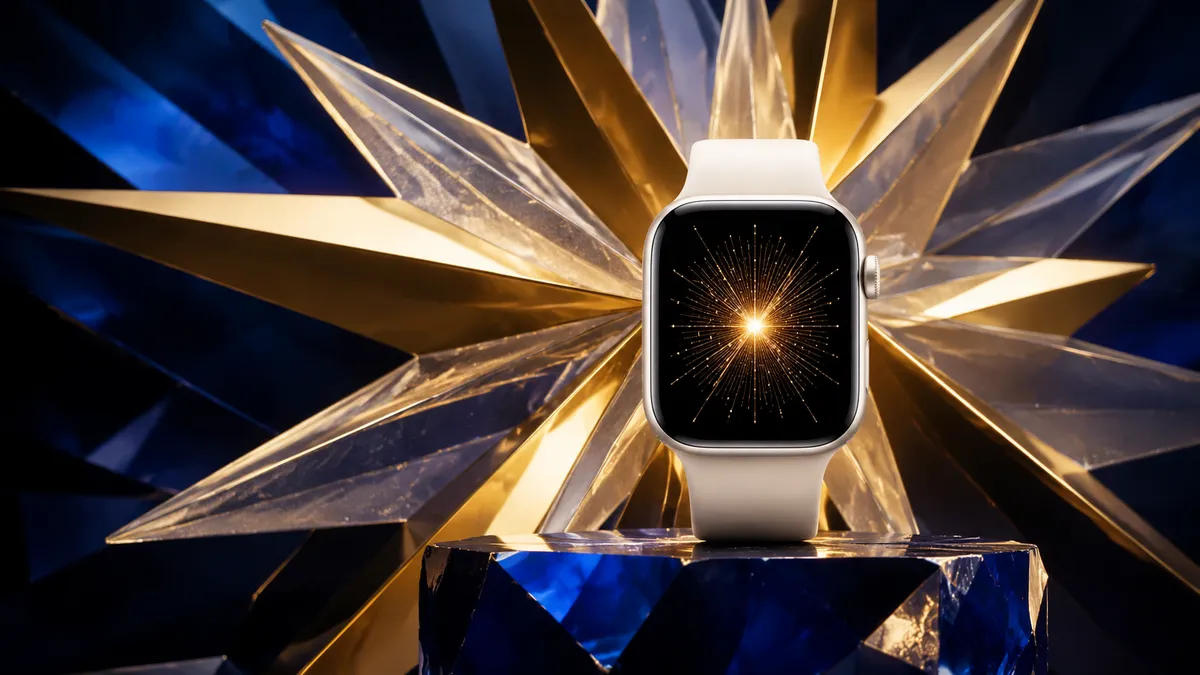
Looking for the perfect event wallpaper for your Apple Watch? Apple’s “Surprise and Shine” event on September 9, 2026 brings fresh artwork that fans turn into stunning watch faces. You can grab official-inspired wallpapers from fan sites like BasicAppleGuy, create your own using the invitation’s color palette, or download one of our curated picks below. Crop to 396 x 484 px for Series 7+ or 368 x 448 px for older models, transfer via the Watch app, and set it as a Photos face.
What Is the “Surprise and Shine” Event?
Apple confirmed its fall hardware showcase under the tagline “Surprise and Shine” for September 9, 2026. The event will stream live from Apple Park in Cupertino and is widely expected to introduce the Apple Watch Series 12, a new iPhone lineup, and possibly updated AirPods.
The biggest rumor surrounding the Watch announcement is the return of a ceramic case option. Apple previously offered ceramic on Series 3 and Series 5 Edition models before quietly removing it. Industry sources like MacRumors report that Series 12 will bring back a white ceramic finish alongside standard aluminum and stainless steel.
On the software side, watchOS 27 is expected to ship alongside Series 12. Early betas have shown new watch face customization options, expanded widget stacks, and improved health tracking features. All of this feeds directly into the event wallpaper scene, since new hardware and software always inspire fresh artwork from Apple’s design team and the wider fan community.
Every Apple event invitation carries a distinct visual identity — a color scheme, graphic treatment, and typography that fans immediately turn into wallpapers. “Surprise and Shine” uses a bright starburst pattern in gold, white, and deep blue, hinting at the ceramic and premium materials expected in the product lineup.
History of Apple Event Wallpapers
Apple has a long tradition of releasing visually striking invitations for its keynote events, and the fan community has turned these into collectible wallpapers for over a decade. Each event gets its own custom artwork that reflects the products being announced.
WWDC events typically feature bold, colorful designs inspired by code and developer culture. The annual iPhone events in September lean toward sleek gradients and product silhouettes. Watch-focused announcements, often bundled with iPhone reveals, tend to use circular motifs and metallic textures that mirror the watch’s round complications and polished cases.
Some of the most popular event wallpapers in recent years include:
- WWDC 2024 “Discover” — rainbow swirl pattern that worked beautifully on round watch faces
- iPhone 16 “Glow Time” — concentric glowing rings in orange and purple
- WWDC 2025 “Build” — geometric blocks in neon primary colors
- iPhone 17 “Next Level” — frosted glass gradient in silver and blue
Fan creators like BasicAppleGuy have built entire archives of event-inspired wallpapers, offering them free in multiple resolutions — including sizes optimized for Apple Watch. These collections have become a tradition of their own, with fans eagerly waiting for each new batch within hours of an event announcement.
What makes event wallpapers special compared to regular backgrounds is their time-limited nature. They mark a specific moment in Apple’s product history, making them feel more personal and collectible than generic designs. Many Apple Watch owners swap their wallpaper to match the current event season, then archive it as a memento once the keynote is over.
8 Best Apple Event Wallpaper Ideas for Apple Watch
Whether you want something official-looking or entirely original, here are eight strong directions for your Apple Watch event wallpaper ahead of “Surprise and Shine.”
1. Official Event Artwork
The most straightforward option: take the colors and shapes from the actual “Surprise and Shine” invitation and adapt them for your watch. The gold starburst on a deep blue background translates well to a small screen. Look for fan-made adaptations that crop the design to a centered square or circle format, keeping the star motif visible without losing detail at watch scale. The contrast between the warm gold and cool blue makes it readable even at a quick glance.
2. Ceramic White Inspired by Series 12
With ceramic rumored for Series 12, a clean white wallpaper with subtle texture is a natural match. Think matte white with faint grain or a slight pearl shimmer — something that mimics the look of glazed ceramic. This works especially well if you own a silver or starlight Apple Watch, creating a monochrome look that feels premium and understated. Add a thin Apple logo watermark in light gray for a subtle branded touch.
3. Neon Glow on Black
Apple event posters often feature bright elements against pure black, and this style translates perfectly to OLED watch screens. The black pixels stay fully off on Apple Watch displays, saving battery while making the colored elements pop. Try a neon gold or electric blue outline of the Apple logo, a starburst shape, or abstract light rays on a black background. This approach gives you the event vibe without overwhelming the small display.
4. Countdown Face Style
Create a wallpaper that doubles as a countdown to the September 9 event. While Apple Watch can display countdown complications, a wallpaper with the date “09.09” styled in the event’s typography and colors adds an extra layer of anticipation. Some fans update their wallpaper daily with a new number — “7 days,” “6 days” — building excitement as the keynote approaches. After the event, the “09.09.2026” version becomes a dated collectible.
5. Apple Logo Variations
The Apple logo is one of the most recognizable symbols in the world, and it looks great on a watch face in almost any treatment. For the “Surprise and Shine” event, try the logo rendered in the invitation’s gold gradient, or split into facets like a gemstone to play on the “shine” theme. A metallic or reflective version of the logo on a dark background is a classic choice that never gets old. Keep the logo centered and sized to about 60% of the watch face for the best proportions.
6. Product Silhouette Wallpapers
Outline-style wallpapers showing the side profile or front view of an Apple Watch make for clean, recognizable backgrounds. For the Series 12 event, you could use a silhouette of the rumored ceramic case with the crown detail visible. White outline on black, gold outline on navy, or the reverse — these minimal designs keep the watch face uncluttered while still celebrating the hardware announcement. Pair with a simple digital time complication for maximum readability.
7. Retro Apple Rainbow Stripe
Apple’s original six-color rainbow logo from the late 1970s through the late 1990s has made a huge comeback in fan wallpaper communities. The horizontal rainbow stripes, adapted to the watch’s aspect ratio, create a bold, colorful background that references Apple’s heritage while still feeling modern. For the event twist, try blending the classic rainbow with the “Surprise and Shine” gold tones — rainbow stripes with a golden shimmer overlay, or the stripes fading into the event’s blue-and-gold palette.
8. Fan-Made Event Art
The Apple fan art community produces incredible original work around every event. Artists on platforms like Twitter/X, Reddit’s r/AppleWatch, and Dribbble create interpretations that go far beyond the official invitation — abstract compositions, 3D renders, illustrated scenes, and typographic experiments all inspired by the event theme. Following hashtags like #SurpriseAndShine and #AppleEvent in the days after the announcement surfaces dozens of unique wallpapers. Many artists offer Apple Watch-optimized versions for free or as part of wallpaper packs.
How to Download and Set Event Wallpapers on Apple Watch
Getting an event wallpaper onto your Apple Watch takes just a few steps, but the process differs slightly depending on where you source the image.
Finding Wallpapers
Start with these reliable sources for Apple event wallpapers:
- BasicAppleGuy — consistently releases multi-device wallpaper packs within hours of each Apple event announcement, always including Apple Watch sizes
- Reddit r/AppleWatch — the community shares and upvotes the best event-inspired designs
- Twitter/X #AppleEvent — search the event hashtag for artist-shared wallpapers
- Apple’s event page — sometimes the event hero image itself works as source material
Setting the Wallpaper
- Save the image to your iPhone’s Photos library (or iCloud Photos for automatic sync).
- Open the Watch app on your iPhone.
- Tap Face Gallery at the bottom.
- Select Photos under the watch face options.
- Choose your downloaded event wallpaper from your photo library.
- Adjust the crop by pinching and dragging — center the key visual element.
- Tap Add to push it to your watch.
Alternatively, you can set a photo face directly from your watch: open the Photos app on Apple Watch, find the image, force press (or long press on Series 7+), and select “Create Watch Face.” For more detailed instructions, check out our guide on how to change Apple Watch wallpaper.
Creating Your Own Apple Event Wallpaper
Making a custom event wallpaper is easier than you might think. You do not need professional design software — free tools like Canva, Figma, or even Apple’s Keynote app can produce polished results.
Step 1: Extract the Event Colors
Save Apple’s event invitation image, then use a color picker tool (built into macOS with the Digital Color Meter app, or any online image color extractor) to grab the exact hex codes. For “Surprise and Shine,” the primary palette includes:
- Deep navy: approximately #0A1628
- Gold/amber: approximately #D4A843
- Warm white: approximately #F5F0E8
- Accent blue: approximately #2E5FA1
Step 2: Choose Your Canvas Size
Set up your design at the correct resolution for your watch model (see the resolution table below). Work at 2x the target size for sharpness, then export at the final dimensions.
Step 3: Design with Simplicity
Apple Watch screens are small. Designs with too much detail turn into visual noise at 40mm or 41mm. Stick to one focal element — a logo, a gradient, a geometric shape — surrounded by breathing room. Use the event colors as your gradient base, and keep any text large enough to read without squinting. If you are adding the event date, use a bold sans-serif font at 30pt or larger relative to the canvas.
Step 4: Export and Transfer
Export as PNG for the sharpest result. Save it to your iPhone Photos and follow the steps above to push it to your watch. If you want inspiration before you start designing, browse our Apple Watch wallpaper ideas collection for layout and color inspiration.
For gradient-based designs that match the event’s warm tones, our gradient wallpaper guide covers techniques that work well with event color palettes.
Apple Watch Wallpaper Resolution Guide
Getting the resolution right ensures your event wallpaper looks sharp and properly cropped on your specific watch model. Here is a quick reference table:
| Apple Watch Model | Case Size | Resolution (px) |
|---|---|---|
| Series 4 / 5 / SE (1st gen) | 40mm | 324 x 394 |
| Series 4 / 5 / 6 | 44mm | 368 x 448 |
| Series 7 / 8 / 9 | 41mm | 352 x 430 |
| Series 7 / 8 / 9 / 10 | 45mm | 396 x 484 |
| Series 10 | 46mm | 416 x 496 |
| Series 12 (expected) | 42mm / 46mm | TBD (likely same as S10) |
| Apple Watch Ultra / Ultra 2 | 49mm | 410 x 502 |
Tip: If you are unsure which model you own, open the Watch app on your iPhone, tap General, then About. The case size and model number appear at the top. When in doubt, design at 410 x 502 px (the largest standard resolution) and let the Photos face crop it down — Apple handles the scaling well.
If you are considering pairing your event wallpaper with an AI-generated design, our AI wallpaper guide explains how to use tools like Midjourney and DALL-E to produce watch-sized images that match event aesthetics.
When to Use Event Wallpapers
Event wallpapers are not a one-day thing. Most fans follow a three-phase approach that stretches the enjoyment across several weeks.
Before the Event (Now Through September 8)
This is the hype-building phase. Set your event wallpaper as soon as the invitation drops to show you are following along. Countdown-style wallpapers work well here. Share your watch face on social media with the event hashtag — it is a fun way to connect with other Apple fans and discover new wallpaper designs in the process.
During the Event (September 9)
On keynote day, many fans update their wallpaper to reflect the new products announced. If Series 12 ceramic gets confirmed, expect a wave of white-themed wallpapers within hours. Some people keep the pre-event wallpaper through the keynote as a tradition, only switching once they have watched the full presentation.
After the Event (September 10+)
This is where event wallpapers become collectibles. Many long-time Apple fans maintain a folder of past event wallpapers, rotating through them seasonally or on event anniversaries. The “Surprise and Shine” wallpaper from 2026 will eventually carry the same nostalgia as the “One More Thing” invitations from years past. Save your favorites at full resolution — you will want them later.
If you plan to pair your new Series 12 with a matching wallpaper, our dedicated Series 12 wallpaper guide will be updated with model-specific recommendations once Apple confirms the final specs and display resolution.
Browse the full WatchWalls collection for hundreds of Apple Watch wallpapers, including event-inspired designs updated for every Apple keynote. Whether you want the official “Surprise and Shine” look or something completely original, you will find the right background for your watch face.
Explore WatchWalls CollectionFrequently Asked Questions
Where can I download official Apple event wallpapers for Apple Watch?
Apple does not release official event wallpapers for Apple Watch directly. However, fan creators like BasicAppleGuy publish free wallpaper packs based on each event’s invitation artwork within hours of the announcement. You can also find event wallpapers on Reddit’s r/AppleWatch community and through Twitter/X searches using the event hashtag. Apple’s own event page sometimes provides high-resolution hero images that you can crop to watch dimensions yourself.
What resolution should an Apple Watch event wallpaper be?
The resolution depends on your watch model. For Series 7 through 10 at 45mm, use 396 x 484 pixels. For the 41mm version, use 352 x 430 pixels. Apple Watch Ultra requires 410 x 502 pixels. If you are unsure, design at the largest resolution (410 x 502 px) and let the Photos face handle the cropping — it scales down cleanly across all models.
Can I make my own “Surprise and Shine” event wallpaper?
Yes. Save Apple’s event invitation image and use a color picker to extract the hex codes (deep navy, gold, and warm white for this event). Open Canva, Figma, or Keynote, set the canvas to your watch’s resolution, and create a simple design using those colors. A gradient, a centered Apple logo in the event colors, or a stylized date graphic all work well. Keep the design minimal — small screens need bold shapes, not fine details.
How do I set an event wallpaper on Apple Watch?
Save the wallpaper image to your iPhone’s Photos. Open the Watch app, go to Face Gallery, and select the Photos face. Choose your event wallpaper, adjust the crop to center the design, and tap Add. The wallpaper will sync to your watch within a few seconds. You can also set it directly from the watch: open Photos on Apple Watch, find the image, long press, and select “Create Watch Face.”
Will Apple Watch Series 12 support custom event wallpapers?
Yes. Every Apple Watch from Series 4 onward supports the Photos watch face, which lets you set any image as your wallpaper. Series 12 running watchOS 27 is expected to continue supporting this feature and may add new customization options. The ceramic case model will pair particularly well with white and gold event wallpapers that complement the material finish.
